To properly display this page you need a browser with JavaScript support.
AllsystemsMax Pro
User guide
[Edit...]
×
Menu
Index
Search
Search
Search
APPLICATION MENU BAR
File
Setup Current Company
Previous page
Next page
(c) AllsystemsMax LLC, 2017
To properly display this page you need a browser with JavaScript support.
Setup Current Company
Please note: You must first
create a new company
by clicking Create New Company and then
select it
by clicking Select Company at the top of the menu, to make it the
current
company, before attempting to return here to configure it here.
Company Information
Click here for details
Top
Tax Schedule
Click here for details
Top
Default Labor Rates
Click here for details
Top
Additional Fees
Click here for details
Top
Work Flow
Click here for details
Top
Inventory Control
Click here for details
Top
Split Pricing
Click here for details
Top
Invoicing
Click here for details
Top
Tracking
Click here for details
Top
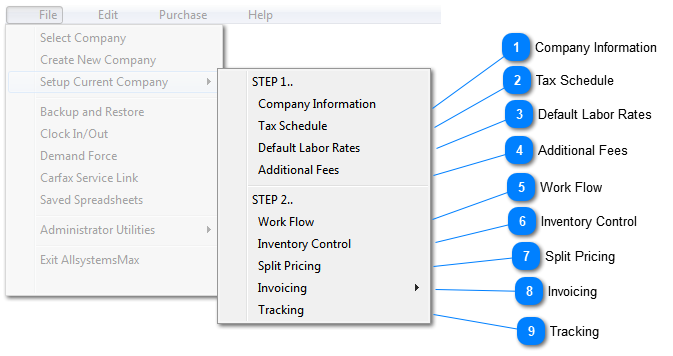
The contents of Setup Current Company
Company Information
Tax Schedule
Default Labor Rates
Additional Fees
Inventory Control
Split Pricing
Invoicing (multi-tab)
Tracking