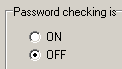
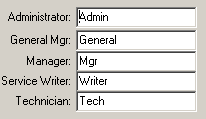
When passord checking is ON, one the 5 passwords will be required before the software can fully open. Starting from the top job function, General Mgr., who will see and have access to the entire program (except administrator utilities), each step down will reveal fewer and fewer menus, tabs and buttons.
Note that passwords are linked to job function, not individuals.
The Administrator has the same program access as the General Mgr., but also has:
1. access to administrator utilites,
2. the ability to turn password checking on and off, and
3. the ability to change the job function passwords, as shown here.